Account access troubleshooting
HICSNow appears unavailable
Check HICSNow Status for the current availability of HICSNow development services. The status page is hosted separately so it can remain available when the application is experiencing an interruption.
If the status page reports that all monitored systems are operational, continue with the troubleshooting guidance below. If it reports an interruption, wait for service recovery before repeatedly attempting to sign in or reset your password.
I forgot my organization's HICSNow address
Use the main HICSNow Login page. Enter your account email and password, then select an authorized workspace if prompted.
My setup or reset link is expired
Setup and reset links expire after 24 hours and can be used only once. Ask a tenant administrator to send a new setup invitation, or submit a new forgot-password request.
My password and confirmation do not match
Re-enter both values. The page confirms when the entries match and when all password requirements are met.
My workspace is not listed
Your membership may still be pending or may have been suspended, deactivated, or removed. Contact a tenant administrator for the missing organization.
My user access is suspended
Access suspended applies to your individual membership in one organization. A tenant administrator must select Reactivate user before you can sign in to that workspace. Other organizations assigned to your HICSNow account are not affected.
When a facility deactivation suspends your account, HICSNow explains that the assigned facility is inactive. Reactivating the facility does not automatically reactivate your user access. A Tenant Administrator must review and reactivate the account separately.
My assigned facility is inactive
Facility unavailable means your account is not assigned to an active facility in that organization. Contact a Tenant Administrator to confirm the facility status or assign your account to an active facility.
If your account belongs to other organizations, those workspaces remain available from the main HICSNow Login page. Tenant Administrators retain organization-wide access even when a facility is inactive.
The entire workspace is suspended
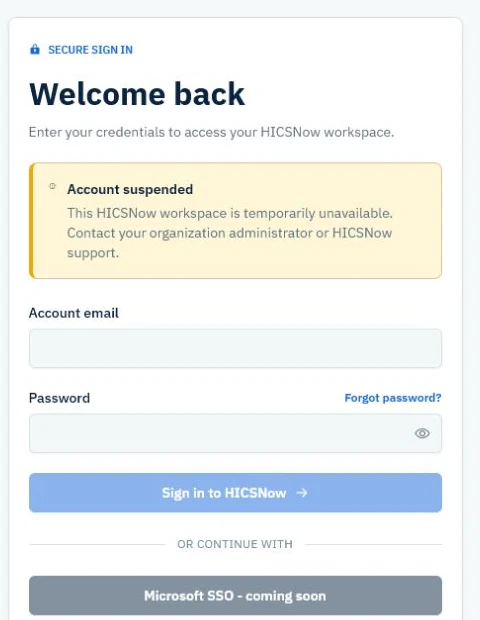
Account suspended means the organization workspace is temporarily unavailable to all tenant users. Contact your organization administrator or HICSNow support. Your account and workspace records are retained.
The workspace is deactivated
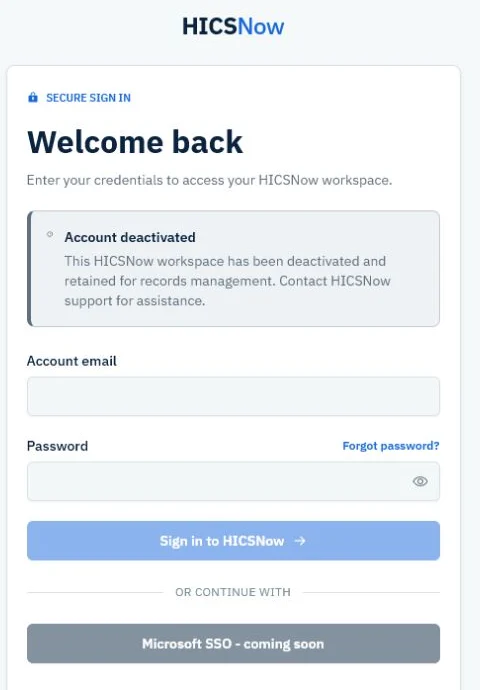
Account deactivated means the organization workspace has been closed while its records are retained. Tenant users cannot sign in. Contact HICSNow support for assistance or reactivation.
The organization login page says the workspace is unavailable
Confirm that the address is correct. An unrecognized address is different from a suspended or deactivated account, which displays a specific account-status message. If the assigned address is correct but remains unavailable, contact your tenant administrator or HICSNow support.
I returned to the login page after signing in
Refresh the page or use the main Login link again. If you are already authenticated, HICSNow should route you to the appropriate dashboard. If the problem continues, sign out completely and start a new session.
I see "Too many sign-in attempts"
HICSNow temporarily limits repeated unsuccessful sign-in attempts. Stop retrying, wait up to 15 minutes, and then enter your account email and password again. Continuing to submit the form during the waiting period does not restore access sooner.
If the next response says the account is suspended, the assigned facility is inactive, or the workspace is unavailable, the password was accepted but the account needs administrative attention. Contact your Tenant Administrator rather than continuing to retry.
I did not receive an email
- Check spam or junk folders.
- Confirm the administrator used your correct account email.
- Wait a few minutes for email delivery.
- Ask an administrator to resend the setup or password-reset message when appropriate.